Component ID
Hardware and Software Guide 1–7
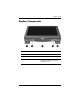
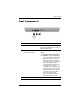
Display Components
Component Description
1
Pen holder Secures the pen to the tablet PC.
2
Pen eject button Ejects the pen from the pen holder.
3
Rotating hinge Swivels the display and converts the
tablet PC from notebook mode into
a
tablet PC mode.
(Continued)