
Startup Guide, Enhanced for Accessibility:

Identifying Exterior Hardware
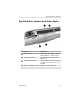
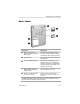
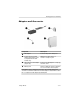
Top: Card Slots, Buttons and Tether Eyelet
Component Description
1
PC Card slot Supports an optional Type I or Type II
32-bit (CardBus) or 16-bit PC Card.
2
PC Card eject button Ejects an optional PC Card from the
PC Card slot.
3
Tablet PC tether eyelet Used with the tether eyelet on the pen
to enable you to tether the pen to the
tablet PC.
4
SD (Secure Digital) card slot Supports an optional SD card.
Startup Guide 5–13