
Startup Guide, Enhanced for Accessibility:

Identifying Exterior Hardware
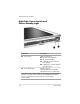
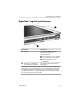
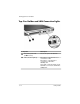
Right Side: Jog Dial and Antenna
Component Description
1
Jog dial* Functions like enter and the up
and down arrow keys on a
standard keyboard.
■ Press inward to enter a command.
■ Rotate upward to scroll upward.
■ Rotate downward to scroll
downward.
2
Antennas, not visible from Send and receive internal wireless
the outside of the tablet PC LAN signals.
†
*This table describes default settings. For information about changing the
rotation functions of the jog dial, refer on the
Documentation Library
CD to
the
Hardware Guide,
“Pen, Command Controls and Keyboards” chapter.
†
For optimal performance, keep the antennas free from obstructions while
you are using an internal wireless LAN
.
Startup Guide 5–7