
Startup Guide, Enhanced for Accessibility:


Solving Problems
■ Make sure the power cord and AC adapter cable connections
are secure.
■ Verify that the electrical outlet is providing adequate power
by plugging another electrical device into the outlet.
When the AC adapter light is on, the tablet PC is receiving
adequate AC power.
✎
If the tablet PC turns on when connected to external power but
not when running on a battery pack, recharge the battery pack.
For more information about running the tablet PC on battery
power, refer on the Documentation Library CD to the
Hardware Guide, “Battery Packs” chapter.
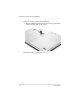
Identifying the AC adapter light
4–2 Startup Guide