
Startup Guide, Enhanced for Accessibility:

Setting Up the Tablet PC
Turning On the Tablet PC
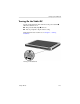
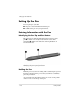
To turn on the tablet PC, slide and release the power switch 1.
When the tablet PC is on:
■ The power/standby light 2 turns on.
■ You are prompted to begin software setup.
If the tablet PC does not turn on, see Chapter 4, “Solving
Problems.”
Turning on the tablet PC
Startup Guide 1–25