
Startup Guide, Enhanced for Accessibility:

Setting Up the Tablet PC
Securing a Battery Pack
Use the battery pack security screw to hold the battery pack in
place, and to protect the battery pack against theft.
A battery pack security screw ships inside the battery bay.
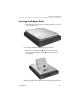
Inserting a Battery Pack Security Screw
To secure the battery pack in the battery bay with a battery pack
security screw:
1. Insert the battery pack into the battery bay as instructed in
“Inserting the Battery Pack,” earlier in this section.
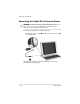
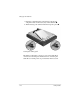
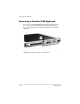
2. Insert a battery pack security screw through the battery pack
case and into the tablet PC.
Inserting a battery pack security screw
✎
The purpose of security solutions is to act as a deterrent.
These solutions do not prevent the product from being
mishandled or stolen.
Startup Guide 1–21