
Startup Guide, Enhanced for Accessibility:

Setting Up the Tablet PC
Opening the Tablet PC and Keyboard
The tablet PC and keyboard are latched in the closed position
on shipment.
To open the tablet PC and keyboard without detaching the
tablet PC from the keyboard:
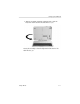
1. Turn the assembly (tablet PC and keyboard) so that the
keyboard latch is facing you.
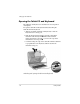
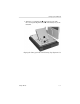
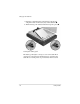
2. Push the keyboard latch firmly to the left to unlock the
tablet PC from the keyboard 1. Then slide and hold
the keyboard latch to the left as you raise the edge of the
tablet PC that is facing you 2.
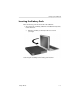
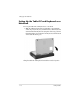
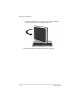
3. Continue raising the edge of the tablet PC until the tablet PC
is perpendicular to the keyboard, with the back of the
tablet PC facing you.
Unlatching and opening the tablet PC and keyboard
1–4 Startup Guide