
Startup Guide, Enhanced for Accessibility:

L
Index
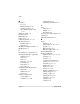
tilting 2–10
unlocking
2–12
keypad
5–23
label
Microsoft Certificate of
Authenticity
5–17
modem approvals 5–17
product identification
5–17
system
5–17
wireless certification
5–17
LAN. See internal wireless LAN;
network
LAN connection lights
5–12
landscape orientation
5–3
language
choosing during setup
1–27
selecting keyboard
1–31
latch
battery pack release
5–15
docking restraint, recess
5–14
keyboard
2–12
, 5–24
See also button(s); switch
light(s)
AC adapter
5–2
battery
5–2
caps lock
5–22
LAN connection
5–12
num lock
5–22
power/standby
5–4
wireless LAN activity
5–2
local area network (LAN). See
internal wireless LAN
lockup, system
5–4
logo key, Microsoft
5–23
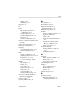
M
microphone 5–8
microphone jack
5–8
Microsoft Certificate of
Authenticity label
5–17
Microsoft logo key
5–23
modem
adapter, country-specific
5–21
approvals label
5–17
cable 5–20
Modem Command Guidelines
2–4
Soft Modem AT Command
Reference Manual
2–4
surge protection
1–37
monitor, external
external monitor connector
5–11
troubleshooting
4–6
N
network
LAN connection lights
5–12
RJ-45 jack
5–11
service boot prompt
5–6
num lock light
5–22
number
keys, on keypad
5–23
Product Key
5–17
serial
5–17
numeric keypad
5–23
O
operating system
Microsoft Certificate of
Authenticity label
5–17
Startup Guide Index–5