
Startup Guide, Enhanced for Accessibility:

Identifying Exterior Hardware
Tablet PC Keyboard Components
This section identifies the hardware components of the tablet PC
keyboard.
■ For information about detaching, attaching, and adjusting the
keyboard, see “Using the Tablet PC Keyboard” in Chapter 2.
■ For information about using the keyboard keys and keypad,
refer on the Documentation Library CD to the Hardware
Guide, “Pen, Command Controls and Keyboards” chapter.
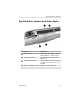
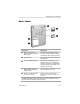
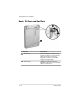
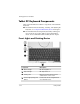
Front: Lights and Pointing Device
Component Description
1
Num lock light On: The keypad is on.
2
Caps lock light On: Caps lock is on.
3
Pointing stick Moves the pointer and selects and
activates items on the screen.
4
Left and right pointing stick Function like the left and right buttons
buttons on an external mouse.
5–22 Startup Guide