
Compaq Tablet PC TC1100 Series Software Guide

Setup, Restore and Support Utilities
Software Guide 7–7
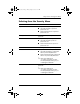
Selecting from the Security Menu
.
Select This Menu Item To Do This
Supervisor Password Is Display status of supervisor password.
■ “Set” indicates that a supervisor
password is set.
■ “Clear” indicates that no supervisor
password is set.
Set Supervisor Password Set, change, or clear a supervisor
password.
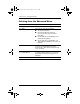
Power-On Password Display status of power-on password.
■ “Set” indicates that a power-on
password is set.
■ “Clear” indicates that no power-on
password is set.
Set Power-On Password Set, change, or clear a power-on password.
DriveLock Display status of DriveLock protection.
■ “Set” indicates that the system hard
drive is protected by DriveLock.
■ “Clear” indicates that the system hard
drive is not protected by DriveLock.
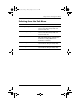
✎
Drive Lock Settings are
accessible only when you enter
the Setup utility by turning on (not
restarting) the tablet PC.
DriveLock Password Set, change, or clear a DriveLock
password.
✎
Drive Lock Settings are
accessible only when you enter
the Setup utility by turning on (not
restarting) the tablet PC.
334243-001.book Page 7 Friday, August 15, 2003 10:22 AM