
Compaq Tablet PC TC1100 Series Getting Started


Setting Up the Tablet PC
Startup Guide 1–17
Turning On the Tablet PC
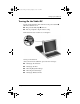
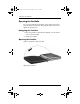
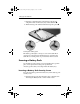
To turn on the tablet PC, slide and release the power switch 1.
When the tablet PC is on:
■ The power/standby light 2 turns on.
■ You are prompted to begin software setup.
If the tablet PC does not turn on, see Chapter 4.
Turning on the tablet PC
After you turn on the tablet PC, proceed to the next steps:
■ “Setting Up the Software”
■ “Setting Up the Pen”
■ “Selecting Regional Settings”
■ “Selecting Screen Settings”
■ “Setting Up Wireless LAN”
334201-001.book Page 17 Tuesday, August 19, 2003 11:17 AM