
Compaq Tablet PC TC1100 Series Docking Station Reference Guide

Using the Tablet PC Docking Station and Screen Protector
Reference Guide 4–3
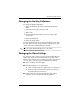
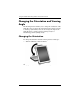
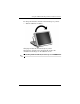
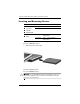
To change the tablet PC orientation from landscape to portrait:
» Turn the tablet PC clockwise.
Changing the tablet PC from landscape to portrait
Changing the orientation also automatically changes the
orientation of the images on the tablet PC screen.
✎
The docking handle should only be at the top or on the left.