
Connecting Your HP SureStore CD-Writer Plus Drive - C4358-90100



4
Installation Guide
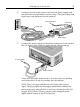
4. Locate the parallel port (printer port) connector on your
computer.
If you are having trouble finding the parallel port connector, your
printer may already be attached to it. The CD-Writer drive can
share the parallel port with your printer.
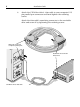
If the CD-Writer drive and your printer will share the parallel
port, go to the next step.
If the CD-Writer drive will not share the parallel port with your
printer, proceed to step 6.
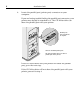
Select an available parallel port.
TIP: Your CD-Writer drive can share a
parallel port with a printer.
Parallel ports
have receptacles
for 25 pins.