
Connecting Your HP SureStore CD-Writer Plus Drive - C4358-90100



Connecting the CD-Writer drive
3
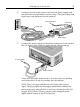
2. Connect one end of the power cord into the power supply and
the other end to a wall outlet or power strip. (The power plug and
outlet may look different in your country.)
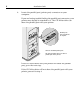
3. Connect the power supply to the power connector on the back of
the CD-Writer drive, with the arrow on the cable facing up.
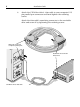
Check that you have power to the CD-Writer drive by opening
and closing the CD tray by pressing the eject button.
NOTE: There is no power switch on the CD-Writer drive or power
supply. The energy-efficient power supply automatically switches into
power-saving mode when the drive is not in use, and may be safely left
plugged in at all times. However, you may safely unplug the power
supply without damage to the CD-Writer drive.
Power supply
To CD-Writer drive
power cord
Green light
(arrow up)
Power connector
To p owe r s u pp l y