
Connecting Your HP SureStore CD-Writer Plus Drive - C4358-90100



Technical Specifications
45
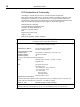
Where to find this information
CD-Writer drive model
The CD-Writer drive model number appears on a sticker on the
back of the CD-Writer drive, as well as on the box.
Example: 3100i
(internal) or 3100e (external)
Drive firmware version
In Windows 95
, the drive firmware version and model number
(above) appear in the CD-ROM settings. Right-click on the My
Computer icon, select Properties , select the Device Manager tab,
double-click on CDROM. Double-click on the CD-Writer drive,
and then click on the Settings tab.
Example: Firmware revision 1.00
In Windows NT,
the drive firmware version and model number
(above) appear in the CD-ROM settings. Open the Control Panel.
Then do one of the following:
Click on SCSI. Scroll down the list, double-click on ATAPI .
Double-click on the CD-Writer drive, and then click on the
Settings tab.
Example: Firmware revision 1.00
Click on SCSI. Scroll down the list, double-click on Shuttle
parallel-to-ATAPI CD. Double-click on the CD-Writer drive,
and then click on the Settings tab.
Example: Firmware revision
1.00
Drive serial number
The CD-Writer drive serial number appears on a sticker on the
back of the CD-Writer drive.
Computer brand and model
The computer brand appears on the front of your computer and
in the documentation that came with your computer.
Example:
Dell Dimension XP-90.