
Connecting Your HP SureStore CD-Writer Plus Drive - C4358-90100



44
Installation Guide
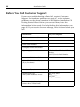
Before You Call Customer Support
If your own troubleshooting efforts fail, contact Customer
Support. For hardware problems see page 47, or for software
problems see the phone numbers in the
Software
Installation
CD
Getting Started insert. Before you contact them, have the
information below ready. For help finding this information, see
page 45. If you receive an error message, write it down before you
call.
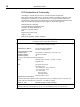
Information For your computer
CD-Writer drive model
Drive firmware version
Drive serial number
Computer brand and model
Operating system and version
Windows 95 or Windows NT 4.0
Ver s io n :
(for NT) Service Pack Number:
Amount of RAM installed
Other CD-ROM drives?
yes/no
(If
yes
, list them)
Sound card?
yes/no
Type:
Parallel port type
and system resources in use
EPP, ECP, other
IRQ _______
I/O port _______
Printer connected to the CD-
Writer drive? What kind?