
Connecting Your HP SureStore CD-Writer Plus Drive - C4358-90100



20
hfll bl h l lbl ddf
Using CDs
This section describes the use of the recordable and rewritable
CDs. It shows you how to:
1. Insert and remove a CD
2. Purchase additional CDs
3. Maintain your CD-Writer drive
Inserting a CD
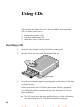
1. Press the eject button on the CD-Writer front panel.
2. Set the CD in the tray with the labeled side up.
3. Press the eject button again or push gently on the front of the tray
to shut the tray.
When you access the CD-Writer drive from within a program,
you should be able to read the files on the inserted CD. If you
have problems:
■
The CD may be in the tray upside-down or a little off-center;
try reinserting the CD. The label should be facing up.
Eject button