
Connecting Your HP SureStore CD-Writer Plus Drive - C4358-90100





Installing the Software
13
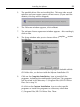
5. The parallel-driver files are installed first. This may take several
minutes and your mouse cursor will not move. (If you used the
diskette, this step will be skipped.)
6. The Welcome window appears, click on Next.
7. The software license agreement window appears. After reading it,
click on Ye s .
8. The Setup window asks you to choose either a
complete
or
custom
installation.
NOTE: For information about the software programs included with the
CD-Writer drive, see the insert with the Software Installation CD.
9. Click on the Complete Installation icon to install all the
programs, including the multimedia QuickTour. The programs
will be stored in the directory C:\Program Files\HP CD-Writer
Plus. Go to step 10.
Or click on the Custom Installation icon to select specific
programs or install the programs to a directory other than
C:\Program Files\HP CD-Writer Plus. Then: