
Connecting Your HP SureStore CD-Writer Plus Drive - C4358-90100





12
Installation Guide
2. If the language-selection screen doesnt automatically appear,
click on the Start button on the task bar, select Run, type
D:\SETUP (where D: is your CD drives letter), then click on OK.
The following screen appears:
3. Select the desired language or leave the default. Click on Next.
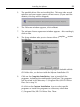
4. Click on the Install Software button on this menu:
Click here to install the software .
Click here for a fun multimedia
tour of the programs that came
with your drive.
Click here to register your new
drive and software.
Click here to view the CDs
contents.