
Connecting Your HP SureStore CD-Writer Plus Drive - C4358-90100





10
Installation Guide
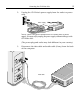
4. Disconnect the printer cable (if
any) from your CD-Writer drive
and reconnect it to the back of
your computer (other cables not
shown but still attached).
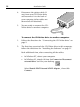
5. You are ready to connect the CD-
Writer drive to another computer.
To connect the CD-Writer drive to another computer:
1. Follow the directions for Connecting the CD-Writer drive on
page 2.
2. The first time you attach the CD-Writer drive to this computer,
follow the directions for Installing the Software on page 11.
Each additional time, after connecting all the cables:
In Windows NT
, reboot your computer.
In Windows 95
, simply click on the Connect or Disconnect
external drive icon on your desktop.
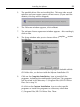
Select Shuttle EPAT External ATAPI Adapter
,
then click
Connect .