
Connecting Your HP SureStore CD-Writer Plus Drive - C4358-90100



Connecting the CD-Writer drive
7
7. Connecting the audio cable is OPTIONAL. If you do not wish to
use it, go to step 10.
The audio cable is used only for hearing music CDs through your
computers sound system. If you do not have a sound board in
your computer, you can still hear music CDs through speakers or
earphones attached to the front of the CD-Writer drive.
NOTE: When the CD-Writer drive records music or data, it uses the
data cable, not the audio cable.
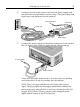
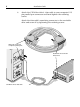
8. If you have a sound board, connect the audio cable to a LINE IN
audio connector on the back of your computer. (Your sound
board may be labeled differently.)
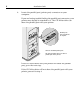
9. Connect the other end of the audio cable to the audio connector
on the back of the CD-Writer drive.
10. Plug in and turn ON your computer.
11. You are now ready to Install the parallel port drivers and the
application software. (See "Installing the Software" on page 11.)
Audio cable
Audio connector
(optional)
LINE IN connector on
sound board (Your sound
board may be labeled
differently.)