
Users Guide - Platform Instrumentation Control

Intel Platform Instrumentation Control (PIC) Console User's Guide
39
Broadcast and LCD Messages
The following table lists broadcast and LCD messages.
Broadcast messages are sent across the network to client computers. The general format of
broadcast messages is:
Check <group_name> at server <server_name>
LCD messages are displayed on the managed server’s LCD. These are limited to 32 characters;
longer messages are truncated. The general format of LCD messages is:
Check: <group_name>
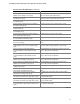
Broadcast and LCD Messages
Message Description
Check: Temperature Sensor.
Check: Temperature Probe.
A temperature sensor reported a change in state
(OK/Noncritical/Critical).
Check: Voltage Sensor.
Check: Voltage Probe.
A voltage sensor reported a change in state
(OK/Noncritical/Critical).
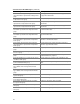
Check: Security Sensor.
Check: Physical Container Global Table.
System chassis front panel or side panel has been opened (or it
was open and has been closed).
Check: Cooling Fan. System fan has stopped (or restarted).
Check: Memory Array. A memory error has been reported on the system.
Check: Host Adapter. A SCSI board reported a state change.
Check: Logical Unit. A SCSI device reported a state change.
Check: Controller Information. A RAID controller reported a state change.
Check: Physical Drive Information. A RAID drive reported a state change.
Check: Processor. A processor error has been reported on the system.
Check: Power Unit Global Table. A power unit redundancy state change has been reported on
the system.
Check: Power Supply. A power supply failed on the system.
Check: Indication Control Group. The LAN Adapter reported a threshold crossing.
Check: Storage Device Events. A SCSI device reported a state change.
Check: Storage Controller Events. A SCSI controller reported a state change.
Check: System Slot. A PHP slot reported a state change.