
Users Guide - Platform Instrumentation Control

32
Memory Tables
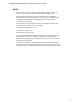
The following tables compare the steps taken with Single-bit and Multi-bit errors and provide the
type of memory information available from the PIC Console software.
SBE and MBE Comparison
Memory Error Handling SBE MBE
Generate SMI Yes Yes
Log information includes Exact SIMM or DIMM Memory bank only
Action after SEL logging Continue operation Stop the system
Indicated by PIC screen changes Immediately After the system reboots
Bad memory is mapped out at next reboot Yes Yes (immediately after the failure)
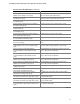
Information available on the Sensor Information tab page of the PIC Console software:
Memory Array Dialog
Item Description
Maximum Memory Capacity The maximum memory capacity in bytes on this system
No. of Memory Device Sockets The number of memory device (SIMM/DIMM) slots or sockets
available in this memory array
No. of Memory Device Sockets Used The number of slots or sockets populated by the memory
devices in this memory array
Memory Error Correction The hardware error correction or detection method supported
by this memory array
Memory Array Location The physical location of the memory array, whether on the
motherboard or an add-on board
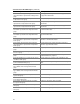
Information on the Sensor Information tab page of the PIC Console software:
Memory Device Information
Item Description
Size Size of the memory device in bytes.
Memory Type Type of memory used in the memory device.
Device Locator A string identifying the socket location or board position of the memory device.
Example: “SIMM 3” or “IC12.”
Device Error Type Most recent type of error that occurred on the memory device.
Last Error Update System state during the last error update.
Total Width Total width of the memory device (SIMM/DIMM including check bits), in bits.
Data Width Data width of the memory device in bits.
Type Detail More information about the memory device type.
Error Count Summary of the error status for the memory device. This read-only attribute
contains a count of all SBEs on the memory device.