
Users Guide - Platform Instrumentation Control

Intel Platform Instrumentation Control (PIC) Console User's Guide
25
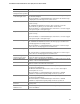
Action Description
Emit a beep from the
managed server’s speaker
Speaker emits a beep.
Display an alert message
on the managed server
Default action for noncritical and critical indications. The message box stays
up until acknowledged.
On Linux Red Hat 7.1 and Red Hat Enterprise Linux AS 2.1 the alert message
is displayed as a text message on the server console.
Log the event to disk Default action for all indications. This option records the event in the standard
system error log.
On and Windows 2000 Advanced Server, PIC records the event in the
System Event Log, which you can view with the Event Viewer.
On Linux Red Hat 7.1 and Red Hat Enterprise Linux AS 2.1, events are logged
in the system log file: /var/log/messages.
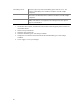
Log the event to disk Default action for all indications. This option records the event in the standard
system error log.
On Linux Red Hat 7.1 and Red Hat Enterprise Linux AS 2.1, events are logged
in the system log file: /var/log/messages.
Broadcast a message Default action for critical indications.
On and Windows 2000 Advanced Server, the message goes to all the users
currently logged into the managed server.
On Linux Red Hat 7.1 and Red Hat Enterprise Linux AS 2.1 a text message is
sent to all users currently logged onto the UNIX server.
Broadcast a message Default action for critical indications.
.
On Linux Red Hat 7.1 and Red Hat Enterprise Linux AS 2.1 a text message is
sent to all users currently logged onto the UNIX server.
Write a message to the
managed server’s LCD
Default action for all indications. If the LCD is not available on the managed
server, this option is grayed out and disabled.
Page an administrator A page is sent to a specified pager, with the phone number of the server, an ID
number, or other numerical information.
No shutdown Default action for all indications. Select this option if you do not want to shut
down or reset the server when an event occurs.
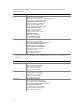
Shutdown the OS Select this option if you want to shut down the OS gracefully (controlled,
closing files and applications).
On Windows 2000 Advanced Server, the server is set to a state ready for
manual power-off or reset.
On Linux Red Hat 7.1 and Red Hat Enterprise Linux AS 2.1, standard
shutdown is completed and system prompts for reboot or power off.
Shutdown the OS Select this option if you want to shut down the OS gracefully (controlled,
closing files and applications).
On Linux Red Hat 7.1 and Red Hat Enterprise Linux AS 2.1, standard
shutdown is completed and system prompts for reboot or power off.
Shutdown the OS and
power off
Select this option if you want to shutdown the OS gracefully and turn off the
system power.
Shutdown the OS and
hardware reset
Select this option if you want to shutdown the OS gracefully and reset the
server via hardware.