
Users Guide - Platform Instrumentation Control
24
4. If you reboot the system and the event condition has not been corrected (such as the
temperature is still over threshold), the system detects the temperature condition, triggers
the event, and the corresponding action is taken. In this example action, Immediate Power
Off, the system is automatically and immediately powered off.
When the system is powered up, an infinite loop of power-up and power-down begins. To break
this cycle, either:
Clear the event condition (cool down the system in this example).
OR
Create a file named C:\LRA.NOT (or insert a diskette with file \LRA.NOT in A: drive) before the
OS boots. The existence of this file disables the software component that responds to the event.
The contents of the file are not important. You must then delete this file after the problem is fixed
to allow the software to operate normally.
Avoiding a Reboot-Fail Retry Loop
User-defined threshold values and other user-defined configuration attributes are written to disk
(persistent storage) so they are available when the server reboots. These “remembered” values
replace the PIC default values when PIC initializes.
When you change a threshold value or alert action in PIC, you can create an environment in which
an event is immediately generated, such as setting the Upper Noncritical Threshold value below the
current sensor reading. If the configured event actions on this threshold included a Shutdown or
Power Control action as described earlier, the server would trigger the Shutdown or Power Control
action and could enter a reboot-fail-reboot-fail cycle using the new threshold value.
To help avoid this situation, PIC updates the server in two steps:
1. Any change you make is valid immediately in the active instrumentation, but PIC waits
five minutes before writing user changes to disk. Thus, if the change causes the server to
reboot, the previous value is restored from disk when the server reboots.
2. PIC then uses and displays the previous value, thus avoiding the immediate
reboot-fail-reboot-fail cycle.
Any change you make will be successfully written to disk as long as the motherboard
instrumentation continues running for five minutes after the change is saved.
Configuring Threshold Event Actions
On the Alert Actions tab page, you can select actions that will take place when a sensor exceeds a
threshold or changes state.
NOTE
If the OS is disabled by a non-critical event (such as a voltage surge), then
critical actions will not be carried out because the OS has been shut down. It
is best to use warnings (such as a speaker beep, a broadcast, etc.) for
non-critical conditions.
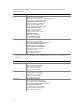
The following table lists the available actions in PIC. You can specify multiple audio/visual
notifications per event but only one shutdown/power control action.