
Users Guide - Platform Instrumentation Control

12
Main Menu Bar
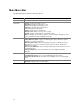
The Main Menu Bar includes the following options:
Item Options
File Menu Exit: Exits the application
View Menu Toolbar: Toggles the toolbar on or off.
Status Bar: Toggles the status bar on or off.
Large Icons: Displays list using large icons.
Small Icons: Displays list using small icons.
List: Displays items in list format.
Details: Displays items in detail format.
Arrange Icons: Arranges icons by name or status.
Refresh: Triggers an immediate screen and data refresh.
Options: Displays the view options dialog so you can configure viewing preferences,
such as temperature format and display refresh rate.
Configure Menu Enable Front Panel Power & Reset: Toggles the front panel power and reset option.
Enable Watchdog Timer: Toggles the watchdog timer option. When this option is
enabled, you can set the timer value.
Watchdog Timer Value: When the watchdog timer option is enabled, the timeout
dialog appears so you can set the timeout value. When the timer is disabled, the
dialog does not appear.
Restore Factory Defaults: Restores factory default values for threshold sensors and
the Watchdog Timer.
Paging Configuration: This command takes you to the paging Configuration
dialog box.
ICMB Menu View Managing Server: Enables the default local managing server view.
View Managed Server(s): Accesses the ICMB-managed server view(s).
Reclaim Inactive Resources: Reclaims inactive ICMB resources on the managing
server.
Help Menu Help Topics: Accesses PIC help topics.
About PIC: Displays PIC version information.