
UserÆs Guide and Technical UserÆs Guide - HP Carrier Grade Server cc3300





HP cc3300 Carrier Grade Server Product Guide
96 Upgrading the Hardware
Configuration Jumpers
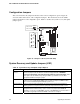
This section describes the jumper blocks that control various configuration options. Figure 36
shows the names and location of the configuration jumpers. The shaded areas show the default
jumper placement for each configurable option. Table 17 describes the system recovery and update
jumper options.
Figure 36. Jumper Locations (J1E1 and J6A2)
System Recovery and Update Jumpers (J1E1)
Table 17. System Recovery and Update Jumper Options
Option Description
BMC Write
Protect
If pins 2 and 3 are jumpered (default), the BIOS boot block is write-protected. If pins 1
and 2 are jumpered, the boot block is erasable and programmable. WARNING:
Incorrect programming of the boot block will render the system unbootable. With
this option set to its default factory setting, the BMC’s operational code can still be
programmed without moving the jumper.
CMOS Clear If pins 4 and 5 are jumpered (default), preservation of configuration CMOS through
system reset is controlled by the BMC. If pins 5 and 6 are jumpered, CMOS contents
are set to the manufacturing default during system reset.
Password Clear If pins 7 and 8 are jumpered (default), the current system password is maintained
during system reset. If pins 8 and 9 are jumpered, the password is cleared on reset.
Recovery Boot If pins 10 and 11 are jumpered (default) the system will attempt to boot using the BIOS
programmed in the Flash memory. If pins 11 and 12 are jumpered, the BIOS will
attempt a recovery boot, loading BIOS code from a CD-ROM disk into the Flash device.
This feature is typically used when the BIOS code has been corrupted.
OM12837
DSR DCD
J6A2
BMC
WP
RCVRY
BOOT
PSWD
CLR
CMOS
CLR
D
C
B
A
J1E1
DSR to Pin #7
DCD to Pin #7