
UserÆs Guide and Technical UserÆs Guide - HP Carrier Grade Server cc3300




HP cc3300 Carrier Grade Server Product Guide
90 Upgrading the Hardware
Removing the Power Supply Cage
To replace the power supply cage, follow these instructions:
1. Remove the front bezel.
2. Disconnect the power cable and SCSI cable from the drive tray.
3. Remove the drive tray.
4. Remove the cable hold-down bracket located underneath the drive tray.
5. Disconnect the power connector from the floppy/CD-ROM signal cable.
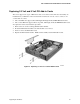
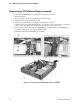
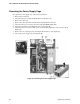
6. Disconnect and remove the 40 mm fan array (A in Figure 30).
7. Disconnect the server board’s main power connector and peripheral power connectors (B in
Figure 30).
8. Remove the two securing screws (C in Figure 30) from the power supply cage.
9. Lift out the power supply cage (D in Figure 30).
Figure 30. Removing the Power Supply Cage