
UserÆs Guide and Technical UserÆs Guide - HP Carrier Grade Server cc3300




HP cc3300 Carrier Grade Server Product Guide
Technical Reference 87
Replacing the Front Panel Board
To replace the front panel board, follow this procedure:
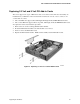
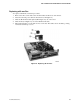
1. Disconnect the small ribbon cable (A in Figure 27).
2. Disconnect the large ribbon cable (B in Figure 27).
3. Remove the screw (C in Figure 27) and release the snap-on fasteners (D in Figure 27).
4. Lift out the board and place it on a clean, static-free surface.
5. To install the new board, repeat the instructions above in reverse order.
Figure 27. Front Panel Removal