
UserÆs Guide and Technical UserÆs Guide - HP Carrier Grade Server cc3300




HP cc3300 Carrier Grade Server Product Guide
86 Upgrading the Hardware
Replacing the CD-ROM and Floppy Assembly
To replace the CD-ROM and/or floppy disk drives, follow this procedure:
1. Remove the bezel.
2. Remove the three screws securing the fan bracket and remove.
3. Unplug and remove the 40 mm-fan module.
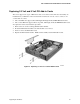
4. Disconnect the ribbon cable (A in Figure 26) from the server board.
5. Disconnect the power cable (B in Figure 26). You can access the power cable by loosening the
captive screw (C in Figure 26), and sliding the peripheral bay out an inch or two.
6. Disconnect the ribbon cable from the CD-ROM/floppy assembly. Slide the CD-ROM/floppy
assembly out through the front panel (D in Figure 26).
7. Install the replacement CD-ROM/floppy assembly.
Figure 26. Removing the Peripheral Bay from the Chassis