
UserÆs Guide and Technical UserÆs Guide - HP Carrier Grade Server cc3300




HP cc3300 Carrier Grade Server Product Guide
82 Upgrading the Hardware
PCI Add-in Card Cable Installation
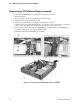
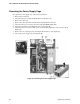
It may be difficult to install a cable on the connector of a PCI add-in card configured at location A
in Figure 24 due to interference from the power supply. If this occurs, it may be necessary to move
the power supply cage out of the way, install the PCI cable on the PCI add-in card, then replace the
power supply.
To connect a PCI cable to a PCI add-in card under these circumstances, follow these instructions:
1. Remove the two screws (B in Figure 24) holding the power supply cage in place.
2. Lift the back of the power supply and rotate it (C in Figure 24) so that it is placed outside of the
unit. (This can be done without disconnecting the cable harness.)
3. Connect the cable to the PCI add-in card.
4. Replace the power supply cage and secure it with the two screws previously removed.
Figure 24. PCI Adapter Cable Installation