
UserÆs Guide and Technical UserÆs Guide - HP Carrier Grade Server cc3300



HP cc3300 Carrier Grade Server Product Guide
Upgrading the Hardware 79
Removing a Processor
1. Observe the safety and ESD precautions at the beginning of this chapter and the additional
cautions given here.
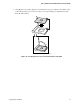
2. Detach the heatsink-retaining clip from the processor socket using a screwdriver or other tool
as shown in Figure 20.
OM12827
Figure 20. Unlatching the Heatsink Retaining Clip
3. Remove the heatsink and powerstrate from the processor.
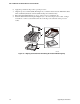
4. Raise the locking bar on the socket as shown in Figure 21.
OM11788
Figure 21. Raising the Locking Bar on the Processor Socket
5. Remove the processor from the socket.
6. If you removed the processor from the secondary socket and are not replacing it, you must
install a terminator in its place.