
UserÆs Guide and Technical UserÆs Guide - HP Carrier Grade Server cc3300




HP cc3300 Carrier Grade Server Product Guide
66 Upgrading the Hardware
Electrostatic discharge (ESD) and ESD protection: ESD can
damage disk drives, boards, and other parts. We recommend that you
perform all procedures in this chapter only at an ESD workstation. If one is
not available, provide some ESD protection by wearing an antistatic wrist
strap attached to chassis ground (any unpainted metal surface) on your server
when handling parts.
ESD and handling boards: Always handle boards carefully. They can
be extremely sensitive to ESD. Hold boards only by their edges. After
removing a board from its protective wrapper or from the server, place the
board component side up on a grounded, static free surface. Use a
conductive foam pad if available but not the board wrapper. Do not slide
board over any surface.
Replacing Power Supply Modules
To replace an AC or DC power supply module, follow this procedure:
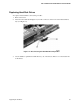
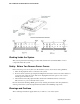
1. Depress the locking tab (A in Figure 11).
2. Rotate the handle downward (B in Figure 11).
3. Using the handle, pull the power supply outward (C in Figure 11).
4. Reverse these steps for installation.
OM12823
C
A
B
Figure 11. Unlocking and Removing the Power Supply Modules