
UserÆs Guide and Technical UserÆs Guide - HP Carrier Grade Server cc3300




Upgrading the Hardware 65
4 Upgrading the Hardware
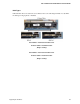
Tools and Supplies Needed
Procedures in this section require the following tools and supplies:
• Jumper-removal tool or needle-nosed pliers
• Small flat-bladed screwdriver
• Phillips
†
(cross-head) screwdriver (#2)
• Pen or pencil
• Anti-static wrist strap and conductive foam pad (recommended)
Figure 10. Tools and Supplies Needed
Equipment log: as you integrate new parts into the system, add information about them to your
equipment log (Appendix B). Record the model and serial number of the system, all installed
options, and any other pertinent information specific to the system.
Cautions
These warnings and cautions apply throughout this chapter.
CAUTIONS
System power on/off: The power button DOES NOT switch off system
power. To remove power from the system, you must unplug/disconnect the
power connections. Make sure power connections are
unplugged/disconnected before you open the chassis, add, or remove any
components.
Hazardous conditions, devices and cables: Hazardous electrical
conditions may be present on power, telephone, and communication cables.
Turn off the server and disconnect the power cord, telecommunications
systems, networks, and modems attached to the server before opening it.
Otherwise, personal injury or equipment damage can result.