
UserÆs Guide and Technical UserÆs Guide - HP Carrier Grade Server cc3300





HP cc3300 Carrier Grade Server Product Guide
Configuration Software and Utilities 57
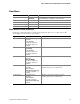
FRU Menu
The FRU menu has the following options:
• Properties: Displays FRU information from the BMC. These fields are display only.
• Reload: Reloads the FRU entries from the server.
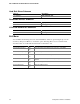
Help
The Help menu has the following option:
• Help Topics: Displays the help information for the FRU Manager Add-in.
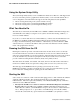
Exiting the SSU
Exiting the SSU causes all windows to close.
• Exit the SSU by opening the menu bar item F
ile in the SSU Main window.
• Click on Exit,
Or,
• Highlight Exit, and press <Enter>.
FRUSDR Load Utility
The Field Replacement Unit (FRU) and Sensor Data Record (SDR) Load Utility is a DOS-based
program used to update the server management subsystem’s product level FRU, SDR, and the SM
BIOS (SMB) nonvolatile storage components (EEPROMs). The load utility
• Discovers the product configuration based on instructions in a master configuration file
• Updates the nonvolatile storage device (EEPROM) associated with the Baseboard Management
Controller (BMC) that holds the SDR and FRU area
• Updates the SMB area located in the BIOS nonvolatile storage device
• Generically handles FRU devices that may not be associated with the BMC
When to Run the FRUSDR Load Utility
You should run the FRUSDR Load Utility each time you upgrade hardware in your server,
excluding add-on PCI boards, hard drives, and RAM. For example, if a second microprocessor or
power supply is added, you need to run this utility. The utility will program the sensors that
monitor the newly added microprocessor or power supply.
Because the firmware must reload to properly initialize the sensors after programming, turn the
server off and unplug/disconnect the power cords from the server. Wait approximately 30 seconds,
and plug-in/reconnect the power cords.
What You Need to Do
The FRUSDR Load Utility is run directly from the HP Server cc2300 & cc3300 User Information
Diagnostics and Utilities Resource CD . Insert the CD and reboot or reset the server to load the
FRUSDR Load Utility.