
UserÆs Guide and Technical UserÆs Guide - HP Carrier Grade Server cc3300



HP cc3300 Carrier Grade Server Product Guide
Configuration Software and Utilities 49
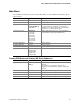
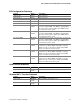
Server Menu
Feature Option Description
► System Management
<Enter> Enters the System Management submenu
► Console Redirection
<Enter> Enters the Console Redirection submenu
► Event Log Configuration
<Enter> Enters the Event Log Configuration submenu
Service Boot [Disabled]
Enabled
Enables the Service Boot option. Option
automatically resets to disabled on next system boot.
Assert NMI on PERR [Disabled]
Enabled
If enabled, NMI is generated. SERR option needs to
be enabled to activate this option
Assert NMI on SERR [Enabled]
Disabled
If enabled, NMI is generated on SERR and logged
BMC IRQ [Disabled]
IRQ5
IRQ11
Sets the BMC IRQ
After Power Failure [Last State]
Stays Off
Power On
Determines the mode of operation if a power loss
occurs
Temperature Sensor [Disabled]
Enabled
If enabled, the system will not boot if the ambient
temperature is outside the range specified in Table 2,
Environmental Specifications Summary.
POST Error Pause [Enabled]
Disabled
If enabled, the system will wait for user intervention
on critical POST errors. If disabled, the system will
boot with no intervention, if possible
Platform Event Filtering [Enabled]
Disabled
Enable/Disable trigger for system sensor events
inside the BMC
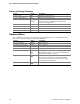
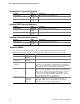
System Management Submenu
Feature Option Description
Board Part Number [A46044-405] Field is informational only.
Board Serial Number [KKC212600176] Field is informational only.
System Part Number Field is informational only.
System Serial Number Field is informational only.
Chassis Part Number Field is informational only.
Chassis Serial Number Field is informational only.
BIOS Version Field is informational only.
BMC Revision Field is informational only.
HSBP Revision [ N/A ] Field is informational only.