
UserÆs Guide and Technical UserÆs Guide - HP Carrier Grade Server cc3300


HP cc3300 Carrier Grade Server Product Guide
Configuration Software and Utilities 45
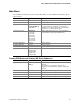
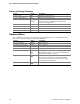
Main Menu
You can make the following selections on the Main Menu. Use the submenus indicated by “►” for
other selections.
Feature Option Description
System Time HH:MM:SS Sets the system time.
System Date MM/DD/YYYY Sets the system date.
Floppy A Not installed
[1.44/1.25 MB 3 ½]
2.88 MB 3 ½
Selects the diskette type. Note: The 1.25 MB
3 ½-inch references a 1024 Byte sector Japanese
media format. Support for the 1.25, 3 ½-inch format
requires a 3 ½ “3-mode” diskette drive.
Hard Disk Pre-Delay [Disabled]
3 Seconds
6 Seconds
9 Seconds
12 Seconds
15 Seconds
21 Seconds
30 Seconds
Adds a delay before first access of the hard drive to
accommodate slow spin-up hard disk drives.
► Primary IDE Master
<Enter> Enters submenu
► Primary IDE Slave
<Enter> Enters submenu
► Processor Settings
<Enter> Enters submenu
Language [English (US)]
Español (SP)
Deutsch (DE)
Italiano (IT)
Français (FR)
Selects which language BIOS displays.
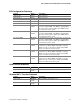
Primary IDE Master and Primary IDE Slave Submenus
Feature Option Description
Type None
[Auto]
Select the type of device that is attached to the IDE
channel.
If you select User, you will need to enter the
parameters of the IDE device (cylinders, heads and
sectors).
LBA Mode Control N/A This field informational only
Multi-Sector Transfers N/A This field informational only
PIO Mode N/A This field informational only
Ultra DMA N/A This field informational only