
UserÆs Guide and Technical UserÆs Guide - HP Carrier Grade Server cc3300



Configuration Software and Utilities 42
3 Configuration Software and Utilities
This chapter describes the Power-On Self Test (POST) and server configuration utilities. The table
below briefly describes the utilities.
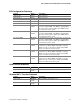
Table 14. Configuration Utilities
Utility Description and brief procedure
BIOS Setup If the system does not have a diskette drive, or the drive is
disabled or incorrectly configured, use Setup to enable it.
Or, you can move the CMOS jumper on the server board from the
default setting (Protect CMOS memory) to the Clear setting; this
will allow most server configurations to boot. Then run the SSU to
configure the server.
System Setup Utility
(SSU)
Use for viewing and clearing the system event log, viewing the
system management FRU information, or viewing the system
management SDR repository.
FRU/SDR Load Utility Use to update the Field Replacement Unit (FRU), Sensor Data
Record (SDR), and SM BIOS (SMB) flash components.
BIOS Upgrade Utility Use to upgrade the BIOS.
Firmware Update Utility Use to update the Firmware.
Using the Adaptec SCSI
Utility
Use to configure or view the settings of the SCSI host adapter and
onboard SCSI devices in the server.