
UserÆs Guide and Technical UserÆs Guide - HP Carrier Grade Server cc2300



cc2300 Carrier Grade Server Product Guide 69
Replacing the Fan Module
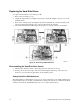
To replace the fan module, follow this procedure:
1. Disconnect the fan module’s power cable from the server board.
2. Press in on the plastic catch (A in Figure 15) to release the fan module.
3. Swing the fan module upward (B in Figure 15) and lift it out of the chassis.
Figure 15. Fan Module Replacement
NOTE
When replacing the fan module, verify that the chassis attachment point and
the mating notch on the end of the fan module opposite the latch have fully
engaged.