
UserÆs Guide and Technical UserÆs Guide - HP Carrier Grade Server cc2300


56 cc2300 Carrier Grade Server Product Guide
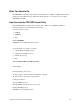
FRU IMBDEVICE on bus FFh, Device ID 00h, IPMB address 20h, LUN 00
Loading Common Header Area
Loading Internal Use Area
Loading Chassis Area
Loading Board Area
Loading Product Area
FRU File Area(s) successfully loaded into FRU memory
Programming complete, reboot server for normal operation
Strike a key when ready….
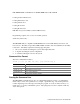
The FRUSDR utility is compatible with ROM-DOS Version 6.22, MS-DOS
†
Version 6.22, and
later versions. The utility accepts CFG, SDR and FRU load files. The executable file for the utility
is frusdr.exe. The utility requires the following supporting files:
• One or more .fru files describing the system’s field replaceable units
• A .cfg file describing the system configuration
• A .sdr file describing the sensors in the system
Command Line Format
The basic command line format is
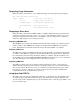
frusdr [/?] [/h] [/d {smb, fru, sdr}] [/cfg filename.cfg] /p
Command Description
frusdr Is the name of the utility
/? Or /h Displays usage information
/d {smb, fru, sdr} Only displays requested area
/cfg filename.cfg Uses custom CFG file
/p Pause between blocks of data
Parsing the Command Line
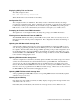
The FRU/SDR Load Utility allows only one command line function at a time. A command line
function may consist of two parameters; for example: cfg filename.cfg. Any invalid parameters
result in displaying an error message and exiting the program. You can use either a slash (/) or a
minus sign (-) to specify command line options. The /p flag may be used in conjunction with any
of the other options.