
UserÆs Guide and Technical UserÆs Guide - HP Carrier Grade Server cc2300

cc2300 Carrier Grade Server Product Guide 49
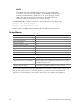
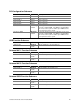
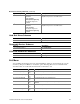
Boot Device Priority Submenu (continued)
Boot Priority Device Option Description
4
th
Boot Device Removable Device
Hard Drive
ATAPI CDROM
[Intel (R) Boot Agent Ve]
Intel (R) Boot Agent Ve
Disabled
Attempts to boot from a network connection.
Requires the presence of a PXE server.
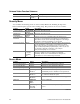
5
th
Boot Device Removable Device
Hard Drive
ATAPI CDROM
Intel (R) Boot Agent Ve
[Intel (R) Boot Agent Ve]
Disabled
Attempts to boot from a network connection.
Requires the presence of a PXE server.
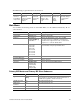
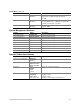
Hard Disk Drives Submenu
Choices Description
1st Hard Drive [AIC 7899,B:0 Disk
Removable Devices Submenu
Choices Description
1st Removable Device [1
st
Floppy Drive]
ATAPI CD-ROM Drives Submenu
Choices Description
1st ATAPI CDROM [SR243T]
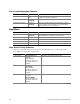
Exit Menu
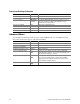
You can make the following selections on the Exit Menu. Select an option using the up or down
arrow keys; then press <Enter> to execute the option. Pressing <Esc> does not exit this menu.
You must select one of the items from the menu or menu bar to exit.
Feature Option Description
► Exit Saving Changes
Yes
No
Exits after writing all modified Setup item values to NVRAM.
► Exit Discarding Change
Yes
No
Exits leaving NVRAM unmodified.
► Load Setup Defaults
Yes
No
Loads default values for all Setup items.
► Load Custom Defaults
Yes
No
Loads values of all Setup items from previously saved custom
defaults.
► Save Custom Defaults
Yes
No
Writes all Setup item values to NVRAM.
► Discard Changes
Yes
No
Exits discarding changes.