
UserÆs Guide and Technical UserÆs Guide - HP Carrier Grade Server cc2300

48 cc2300 Carrier Grade Server Product Guide
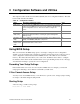
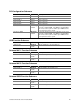
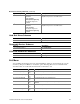
Event Log Configuration Submenu
Feature Option Description
Clear All Event Logs [No]
Yes
Allows user to clear all event logs. Setting to Yes will clear
the DMI event log after system boot.
Event Logging Disabled
[Enabled]
Allows user to log DMI events.
Critical Event Logging Disabled
[Enabled]
Allows user to enable critical error event logging. Critical
errors are fatal to system operation. They include PERR,
SERR, ECC memory errors, and NMI.
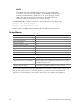
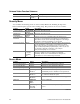
Boot Menu
Feature Option Description
Quite Boot Disabled
[Enabled]
Disabled displayed normal POST messages. Enabled
displays OEM logo and disables serial redirection.
► Boot Device Priority
<Enter> Enters submenu.
► Hard Disk Drives
<Enter> Enters submenu.
► Removable Devices
<Enter> Enters submenu.
► ATAPI CDROM Drives
<Enter> Enters submenu.
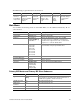
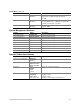
Boot Device Priority Submenu
Use the up or down arrow keys to select a device; then press the <+> or <-> keys to move the
device higher or lower in the boot priority list.
Boot Priority Device Option Description
1
st
Boot Device [Removable Device]
Hard Drive
ATAPI CDROM
Intel (R) Boot Agent Ve
Intel (R) Boot Agent Ve
Disabled
Attempts to boot from the diskette drive.
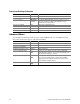
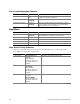
2
nd
Boot Device Removable Device
[Hard Drive]
ATAPI CDROM
Intel (R) Boot Agent Ve
Intel (R) Boot Agent Ve
Disabled
Attempts to boot from a hard disk drive.
3
rd
Boot Device Removable Device
Hard Drive
[ATAPI CDROM]
Intel (R) Boot Agent Ve
Intel (R) Boot Agent Ve
Disabled
Attempts to boot from the CD-ROM drive.
continued