
UserÆs Guide and Technical UserÆs Guide - HP Carrier Grade Server cc2300

42 cc2300 Carrier Grade Server Product Guide
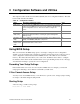
NOTE
If the BIOS setup option “POST Diagnostic Screen” is enabled (Default),
you will not see the message “Press <F2> to enter SETUP”. This message is
hidden by the Manufacturer’s Splash screen. To see the message, press the
<ESC> key while the splash screen is displayed. This will temporarily
disable the splash screen allowing you to see the message.
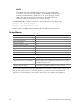
If CMOS/NVRAM is corrupted, you will see other prompts but not the <F2> prompt:
Warning: cmos checksum invalid
Warning: cmos time and date not set
In this condition, the BIOS will load default values for CMOS and attempt to boot.
Setup Menus
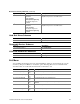
To: Press
Get general help <F1> or <Alt+H>
Move between menus
← →
Go to the previous item
↑
Go to the next Item
↓
Change the value of an item + or -
Select an item or display a submenu <Enter>
Leave a submenu or exit Setup <Esc>
Reset to Setup defaults <F9>
Save and exit Setup <F10>
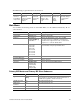
When you see this: It means:
On screen, an option is shown but you
cannot select it or move to that field.
You cannot change or configure the option in that menu screen.
Either the option is auto-configured or auto-detected, or you must
use a different Setup screen.
On screen, the phrase Press Enter
appears next to the option.
Press <Enter> to display a submenu that is either a separate full
screen menu or a popup menu with one or more choices.
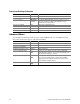
The rest of this section lists the features that display onscreen after you press <F2> to enter Setup.
Not all of the option choices are described, because (1) a few are not user selectable but are
displayed for your information, and (2) many of the choices are relatively self-explanatory.