
UserÆs Guide and Technical UserÆs Guide - HP Carrier Grade Server cc2300



cc2300 Carrier Grade Server Product Guide 109
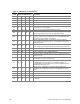
Table 21. POST Code - Port 80h Codes (continued)
Post
Code Diagnostic LED Decoder
Description
MSB LSB
Note: G=Green, R=Red, A=Amber
12h Off Off G R Initializing APP CMOS RAM for appliance servers only.
12h Off Off G R Check point after CMOS initialized.
27h Off G A G Validate date and time in RTC.
F4h R A R R Load micro code to all CPUs.
F6h R A A R Scan SMBIOS GPNV areas.
15h Off G Off A 8254 timer test on channel 2.
15h Off G Off A Enable 8042.
15h Off G Off A Keyboard reset.
26h Off G A Off Initialize LCD, if supported.
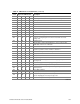
28h G Off R Off
Set Video Mode: initialization before setting the video mode is
complete. Configuring the monochrome mode and color mode
settings next.
29h G Off R G Debugger hook.
2Ah G Off A Off
Init PCI devices and motherboard devices. Pass control to video
BIOS Start serial console redirection.
2Bh G Off A G Platform hook.
2Dh G G R G
Initialize AMI display manager module. Initialize support code for
headless system if no video controller is detected.
2Dh G G R G Scan flash for logos and Initialize logo data areas.
30h Off Off R R Detect PS/2 mouse.
30h Off Off R R Hook after c000 ROM control.
2Eh R R A Off Set up video parameters in BIOS data area.
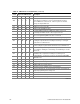
37h Off G A A
Activate ADM: the display mode is set. Displaying the power-on
message next.
37h Off G A A Initialize language module. Display splash logo.
37h Off G A A Display Sign-On Message BIOS ID and processor information.
38h G Off R R
Detect USB mouse: initializing the bus input, and general devices
next, if present.
34h Off G R R Reset IDE controllers.
39h G Off R A Displaying bus initialization error messages.
3Ah G Off A R
Display Setup Message the new cursor position has been read and
saved. Displaying the hit setup message next.
40h Off R Off Off Ensure timer keyboard interrupts are on.
continued