
User Information and Service Guide - HP Carrier-Grade Server cc3310

Chapter 9 99
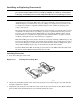
Figure 11-9. Installing Processors
OM14133
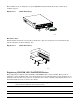
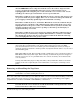
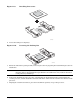
4. Lower the locking bar completely.
Figure 11-10. Lowering the Locking Bar
OM14135
5. Follow the instructions packaged with your boxed processor for preparing the heatsink and processor for
installation.
CAUTION Use care when handling the heatsink. Protect the fans and thermal pad. Do not scratch or
otherwise damage the black thermal pad. Failure to heed this notice may result in decreased
cooling efficiency and damage.
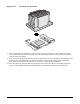
6. Position the heatsink above the processor, ensuring that the black thermal pad is positioned directly
over the processor, and the heatsink is oriented such that it will fit into the retainers at both sides of the
processor.
7. Aligning the raised metal surfaces, place the heatsink into position, on top of the processor.