
User Information and Service Guide - HP Carrier-Grade Server cc3310

92 Chapter 8
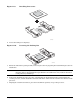
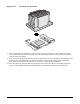
6. When reinserting DC power supply module, make sure the handle is in the downward position before
sliding DC power supply module into DC power supply cage.
7. Secure the terminal block to the replacement power supply using 2 Phillips head screws.
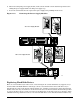
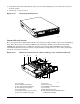
Figure 11-2. Removing the Power Supply Modules
TP249
C
A
B
D
E
F
DC Power Supply Module
AC Power Supply Module
G
H
Replacing Hard Disk Drives
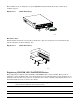
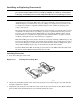
There are two hard drive bays in the server (1 and 2 in Figure 11-3). Each hard drive bay supports a tray-
mounted Ultra-320 SCSI disk drive with single connector attach (SCA) interconnect. The drive tray is
installed into the front of the chassis in the hard drive bay, and then secured in place using the horizontal
handle on the drive tray. A small lever on the front of the server is then rotated into the horizontal position
to connect the SCA connector on the server flex circuit SCSI cable to the SCA connector on the drive. Ultra-
320 SCSI technology (SCA interconnect) or slower hard disk drives can be installed in this hard drive tray.