
User Information and Service Guide - HP Carrier-Grade Server cc3310


46 Chapter 5
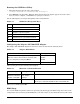
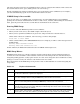
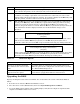
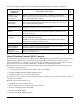
If you select multiple options, the Server Configuration Wizard will run each option to completion.
To Use the Server
Configuration
Utility to
Description of Procedure
Page
Configure the server
for remote LAN
management
Enable a connection to the server from a workstation on the LAN to
allow remote management functions, such as powering the server on or
off, or running diagnostic utilities.
52
Configure for remote
serial/modem
management
Enable a connection to the server from a serial or modem connection to
allow remote management functions, such as powering the server on or
off, or running diagnostic utilities.
54
Configure for
serial/modem alerting
Configure the server to send a telephone page in the event that a
hardware or firmware error occurs at the server.
55
Configure for LAN
alerting
Configure the server to send a notification message to a workstation
segment of the network in the event that a hardware or firmware error
occurs at the server.
57
Run the FRU/SDR
load utility
Use to update the Field Replaceable Unit (FRU) and Sensor Data
Record (SDR) flash components
NOTE: You must run the FRU/SDR load utility whenever the BMC is
updated or if you change your processors.
59
Configure an asset tag Assign an identification number or serial number to the server. 62
Create/modify the
service partition
If a service partition does not already exist, create one. If a service
partition has been created earlier, update it.
62
Save/load
configuration data
Save the configuration data to a file. Use this saved file to configure
other servers identically.
63
Direct Platform Control (DPC) Console
The DPC console is part of Intel Server Management (ISM). Direct Platform Control is a server management
application that supports remote system management via LAN, or an RS-232 serial connection to the
server’s Serial B port over a modem or a direct serial cable. The DPC console provides the ability for remote
management of servers via modem or LAN with a capability to run DOS-based programs.
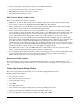
The DPC console runs on a management workstation and is independent of the server operating system. It
communicates with a server by:
• Accessing the server management capabilities of the on-board NIC
• A Windows 2000 or Windows 2003 compatible modem
• An RS-232 connection to the server’s Serial B port
Even when the server is off, you can use the DPC console to verify the state of a server or diagnose a problem
with the server hardware.
The DPC console features allow you to:
• Establish connection to remote servers
• Server control: power on, power off, and reset operations
• Retrieve and display entries in the SEL
• Retrieve and display SDRs
• Retrieve and display FDR information