
User Information and Service Guide - HP Carrier-Grade Server cc3310


Chapter 5 41
Running the SCSISelect Utility
1. When this message appears on the video monitor:
<<<Press <Ctrl><A> for SCSISelect(TM) Utility!>>>
2. Press Ctrl+A to run the utility. When the main menu for the host adapter appears, choose the device
that you want to configure; each SCSI bus accepts up to 15 devices.
Use the following keys to navigate through the menus and submenus:
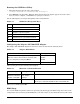
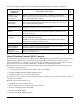
Table 4-3. SCSISelect Navigation Keys
Press To
ESC Exit the utility
Enter Select an option
↑
Return to a previous option
↓
Move to the next option
F5 Switch between color and monochrome
F6 Reset to host adapter defaults
Configuring the Adaptec AIC-7902 SCSI Adapter
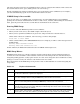
The Adaptec AIC-7902 SCSI adapter has two buses. Select the bus from the following menu:
Table 4-4. Adaptec Main Menu
Menu Item Options
You have an AIC-7902 adapter in your system.
Move the cursor to the bus:device:channel of the
one for configuration and press Enter.
Bus:Device:Channel
01:06:A
01:06:B
F5—Toggle color/monochrome.
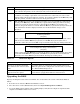
After selecting the bus, the following menu displays:
Table 4-5. Menu for each SCSI Channel
Host Adapter Option Comment
AIC-7902 at
Bus:Device:Channel
01:06:A (or 01:06:B)
Configure/view
host adapter
settings
Press Enter to view the configuration menu
SCSI disk utilities
Press Enter to view the SCSI disk utilities menu. This menu
allows you to format hard disks and/or verify disk media.
When you are finished, press Esc.
BIOS Setup
You can run BIOS setup with or without an operating system being present. BIOS setup stores most of the
configuration values in battery-backed CMOS; the rest of the values are stored in flash memory. The values