
User Information and Service Guide - HP Carrier-Grade Server cc3310


88 Chapter 8
Item Feature Description
D Major (amber or red) When continuously lit, indicates the presence of a major system
fault. A major system fault is an error or event that is detected by
the system that has discernable impact to system operation. In this
case, the system can continue to operate but in a degraded fashion
(reduced performance or loss of nonfatal feature reduction). An
example could be the loss of one of two mirrored disks. The front
panel major alarm relay will be engaged.
E Minor (amber) When continuously lit, indicates the presence of a minor system
fault. A minor system fault is an error or event that is detected by
the system but has little impact to actual system operation. An
example would be a correctable ECC error. The front panel minor
alarm relay will be engaged.
F Power (amber) When continuously lit, indicates the presence of a power system
fault. The front panel power alarm relay will be engaged.
Front Panel Status LEDs
G Disk 1 Activity/Fault LED
(green/amber or red)
Indicates disk 1 SCSI hard drive activity when green, or a disk 1
SCSI hard drive fault when amber or red.
H Disk 2 Activity/Fault LED
(green/amber or red)
Indicates disk 2 SCSI hard drive activity when green, or a disk 2
SCSI hard drive fault when amber or red.
I Main power LED (green) When continuously lit, indicates the presence of DC power in the
server. The LED goes out when the power is turned off or the power
source is disrupted.
J NIC0/NIC1 activity LED
(green)
Indicates activity on either NIC0 or NIC1.
K System ID LED (white) Indicates any system SCSI hard drive activity.
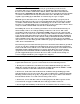
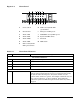
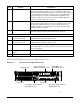
Figure 2-3 shows the front view of the server with the bezel removed.
Figure 2-3. Front View with Bezel Removed
TP181
Peripheral Bay
Front Panel Control
Switches and Status LEDs
RJ45 COM2 and
Dual USB Connectors
Drive Bay 2
Drive Bay 2 SCSI Connector
Engagement Lever
Drive Bay 1
Drive Bay 1 SCSI Connector
Engagement Lever