
User Information and Service Guide - HP Carrier-Grade Server cc3310

Chapter 9 107
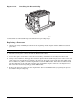
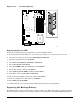
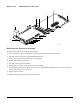
Figure 11-15. Replacing the Back-up Battery
OM14141
Replacing 3.3-Volt and 5-Volt PCI Add-in Cards in Full-Length PCI
Adapter Subsystem
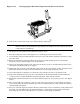
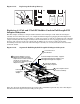
This PCI adapter assembly is configured and installed as shown in Figure 11-16. After the PCI adapter
assembly is removed from the server, it is configured with PCI adapters by plugging the PCI adapters into
the PCI connectors on the riser card (either a 3.3-Volt riser card or a 5-Volt riser card) that is part of the PCI
adapter assembly. The PCI adapter assembly is then installed into the server by plugging the riser card into
the riser card connector on the server baseboard. In addition, it is necessary to make sure that the
interlocking metal tabs on the back of the PCI adapter assembly are correctly inserted into the slots in the
back of the chassis.
Figure 11-16. Segment B Full-Height, Full-Length PCI Adapter Subsystem
TP125
3
Install PCI Adapter(s) in PCI
Adapter Assembly. Re-tighten
Captive Screw on PCI Card Keep
and Screw on PCI Bracket
to Secure PCI Adapter(s) in PCI
Adapter Assembly.
Full-Height, Full
Length PCI
Adapter
4
Install PCI Adapter
Assembly in System
3-slot PCI Adapter Assembly - supports
full-height/full-length PCI adapters and
full-height/half-length PCI adapters
Loosen Captive Screw
on PCI Card Keep.
2
1
Loosen Screw on
PCI Bracket.
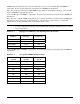
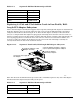
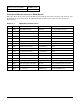
Table 11-5 shows the maximum PCI bus speed achievable on PCI Bus Segment B. Any slower PCI adapter
installed in the PCI adapter subsystem will gate the speed.